Digital Business Systems: Connecting People, Processes, and Technology
How digital business systems connect people, processes and technology: ERP, automation, integration, reliable data, AI and a practical implementation roadmap.

Businesses today rely on multiple digital tools to manage their operations. From customer relationship management and accounting to project management, inventory, communication, and reporting, software has become part of almost every business function.
However, adopting more software does not automatically make a business more efficient.
Many organizations still struggle with disconnected applications, duplicated information, manual processes, inconsistent reporting, and limited visibility into their operations. The problem is often not the absence of technology. It is the absence of a connected business system.
A well-designed digital business environment brings people, processes, information, and technology together. It helps organizations manage their operations more effectively, make informed decisions, reduce unnecessary manual work, and build a foundation for sustainable growth.
The real objective is not simply to digitize individual tasks. It is to create an operational environment in which different business functions work together.
What Are Digital Business Systems?
Digital business systems are interconnected software applications, platforms, workflows, and information structures that support an organization’s daily operations and business objectives.
They help businesses manage activities across different departments, including:
- Sales and customer relationship management.
- Finance, accounting, and financial reporting.
- Human resources and employee management.
- Project management and service delivery.
- Inventory, procurement, and supply chain operations.
- Customer support and communication.
- Business intelligence and operational reporting.
These systems can include standalone applications, integrated software platforms, enterprise resource planning (ERP) solutions, custom-built applications, and automated workflows.
For example, when a company receives a new customer order, the information may need to move through several departments. Sales records the order, finance handles billing, operations manages fulfillment, and management monitors performance.
If these activities happen in disconnected applications, employees may need to enter the same information repeatedly or manually communicate updates between departments.
A connected digital business system allows information to move between these functions through defined processes and integrations.
The result is a more consistent way of managing business activities.
Why Disconnected Business Tools Create Operational Problems
Many organizations adopt software gradually. One department selects a tool for communication, another chooses an accounting platform, and a third introduces a project management application.
Initially, these decisions may solve individual problems. Over time, however, the organization can end up with a collection of applications that do not work together effectively.
This creates several operational challenges.
1. Information becomes fragmented
When departments maintain separate records, management may struggle to obtain a complete picture of business performance.
Customer information, financial records, project updates, and operational data may exist in different systems.
Employees spend time collecting and reconciling information instead of using it.
2. Manual work increases
Disconnected systems often require employees to transfer information manually.
For example, a sales team may update a customer record in one application while the operations team maintains a separate project record elsewhere.
Without integration, the same information may need to be entered multiple times.
This increases administrative effort and creates opportunities for mistakes.
3. Management visibility becomes limited
Business owners and managers need reliable information to understand what is happening across their organizations.
If reporting depends on manually collected spreadsheets and departmental updates, management decisions may be delayed or based on incomplete information.
4. Accountability becomes difficult
When responsibilities and workflows are spread across multiple tools, it becomes harder to understand who owns a task, where a process stands, and what needs attention.
Clear ownership and operational visibility are essential for consistent execution.
The objective should be to reduce these gaps through better system design, defined workflows, and appropriate integration.
The Foundation: People, Processes, and Technology
Successful digital transformation depends on three closely connected elements: people, processes, and technology.
These elements should be considered together rather than independently.
People: Define ownership and responsibilities
Technology cannot replace the need for clear organizational responsibilities.
Employees need to understand their roles, the information they are expected to maintain, and how their work contributes to broader business objectives.
A system should support employees in performing their responsibilities rather than introduce unnecessary administrative complexity.
Processes: Establish how work should happen
Before implementing software, organizations should understand their existing business processes.
This includes identifying:
- How information enters the organization.
- How tasks move between departments.
- Who approves important decisions.
- Where delays and bottlenecks occur.
- Which activities require manual intervention.
- What information management needs to monitor.
Documenting these processes helps identify opportunities for improvement.
Automating an inefficient process without addressing its underlying problems can simply make the inefficiency happen faster.
Technology: Select the right tools
Once business requirements and workflows are understood, organizations can evaluate the technology needed to support them.
The selection should consider functionality, scalability, integrations, security, usability, reporting, and long-term maintenance.
Technology should serve the business process, not force the organization into unnecessary complexity.
When people, processes, and technology are aligned, digital systems become more useful and sustainable.
ERP Systems: Bringing Business Operations Together
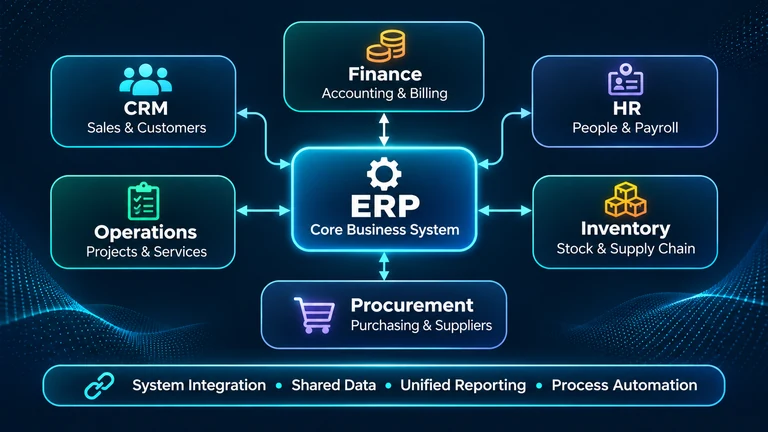
Enterprise Resource Planning (ERP) systems provide a structured way to manage multiple business functions through a shared operational platform.
Depending on the solution and implementation, an ERP may support:
- Financial management and accounting.
- Procurement and purchasing.
- Inventory and warehouse management.
- Human resources.
- Sales and order management.
- Project and resource management.
- Operational reporting.
One of the primary advantages of an ERP system is its ability to centralize business information and connect activities across departments.
Consider a manufacturing business.
A customer order may initiate several connected activities:
- Sales records the customer order.
- The system checks inventory availability.
- Procurement identifies any material shortages.
- Production receives the required information.
- Finance manages invoicing and payments.
- Management monitors order status and operational performance.
When these activities operate through a properly configured system, departments can work with more consistent information.
However, ERP implementation is not simply a matter of purchasing software and importing existing records.
It requires process analysis, data preparation, configuration, user training, testing, and organizational adoption.
An ERP system is valuable when it reflects how the business needs to operate.
Business Process Automation: Beyond Replacing Manual Tasks
Automation is another important component of digital business systems.
Organizations often begin with simple automation opportunities, such as sending notifications, generating documents, assigning tasks, or updating records.
However, the greater opportunity comes from connecting multiple activities into complete workflows.
For example, a customer onboarding workflow might include:
- Capturing customer information.
- Validating required details.
- Creating a customer record.
- Assigning an internal owner.
- Generating relevant documentation.
- Sending confirmation notifications.
- Creating follow-up tasks.
Instead of employees manually coordinating every step, the system can execute predefined actions while keeping people involved where judgment, approval, or intervention is required.
Good automation should improve consistency, reduce repetitive work, and make processes easier to monitor.
Not every activity should be automated. Decisions involving exceptions, sensitive information, financial approvals, or complex customer situations may require human oversight.
The objective is to automate appropriate tasks while preserving accountability.
System Integration and the Importance of Reliable Data
Even when an organization uses specialized applications, those applications do not necessarily need to be replaced by one large platform.
In many cases, integration is a more practical approach.
System integration allows different applications to exchange information through APIs, webhooks, middleware, or other supported mechanisms.
For example:
- A CRM can share customer information with an ERP.
- An accounting application can receive approved billing information.
- A project management platform can synchronize task and delivery updates.
- A customer support system can retrieve relevant customer records.
- Reporting tools can consolidate information from multiple sources.
However, integration requires careful planning.
Organizations should establish which system owns each important data record, how information is validated, how duplicate records are handled, and what happens when an integration fails.
Data consistency is particularly important.
If different systems maintain conflicting versions of the same information, integration can spread errors rather than solve them.
A reliable integration strategy therefore considers data ownership, validation, access permissions, synchronization frequency, error handling, and monitoring.
Planning and Implementing Digital Business Systems
Implementing a business system should be treated as a structured technology and operations initiative.
Starting with software selection before understanding business requirements often creates unnecessary cost and implementation challenges.
A practical implementation approach includes the following stages.
1. Understand business requirements
Begin by identifying the business objectives and operational challenges.
What needs to improve? Which processes are inefficient? What information is missing? Which departments need better coordination?
Requirements should describe actual business needs rather than simply list requested software features.
2. Map existing processes
Document the current workflows, responsibilities, approvals, dependencies, and information flows.
Identify unnecessary steps, duplication, delays, and opportunities for standardization.
3. Define the target architecture
Determine which applications are required, how they should communicate, where information should be stored, and how users will access the system.
Consider existing software investments before introducing additional platforms.
4. Prioritize implementation
Avoid attempting to transform every department simultaneously.
Start with processes that have clear business value, manageable complexity, and measurable outcomes.
A phased implementation allows organizations to learn, adjust, and reduce operational disruption.
5. Develop, configure, and integrate
Configure existing software or develop custom functionality according to approved requirements.
Implement integrations, access controls, workflows, reporting, and other necessary components.
6. Test before deployment
Testing should cover more than whether individual features work.
Verify complete business workflows, data accuracy, permissions, integration behavior, error handling, and reporting.
Involve actual users in testing wherever possible.
7. Train users and manage adoption
Employees need to understand how the new system changes their daily responsibilities.
Provide appropriate training, documentation, and support.
A technically successful implementation can still fail if employees do not understand or adopt the system.
8. Monitor and improve
After deployment, monitor system usage, operational performance, user feedback, and business outcomes.
Digital systems should evolve as business requirements change.
Common Mistakes in Digital Business System Implementation
Organizations can invest substantial resources in technology without achieving the expected operational improvements.
Some common mistakes include:
Choosing software before understanding requirements. Selecting a platform based on popularity or feature lists can result in a poor fit for actual business processes.
Automating inefficient workflows. Existing processes should be evaluated before automation. Otherwise, unnecessary steps become embedded in the new system.
Ignoring data quality. Inconsistent, duplicated, or incomplete information can affect reporting, integrations, and business decisions.
Overcomplicating the architecture. Introducing too many applications, integrations, and customizations can increase maintenance costs and operational complexity.
Underestimating user adoption. Employees need clear responsibilities, training, and support. Technology alone does not create organizational change.
Ignoring long-term ownership. Every business system needs ongoing maintenance, security updates, monitoring, documentation, and a clear support structure.
Avoiding these mistakes requires coordination between business leadership, operations, project management, and technical teams.
Where AI and Intelligent Automation Fit
Artificial intelligence is creating new opportunities for business systems, particularly in information processing, decision support, document handling, and workflow automation.
AI-enabled capabilities can support activities such as:
- Extracting information from documents.
- Categorizing customer requests.
- Identifying patterns in operational data.
- Generating summaries and reports.
- Supporting internal knowledge searches.
- Assisting employees with repetitive information-based tasks.
- Identifying unusual activity that may require investigation.
However, AI should be introduced with a clear business purpose.
Organizations need to evaluate data quality, privacy, security, accuracy, integration requirements, and the level of human oversight required.
AI is not a replacement for sound business processes or reliable system architecture.
Its value increases when it is introduced into well-defined workflows with appropriate controls and measurable objectives.
The goal should be to use intelligent capabilities where they create genuine operational value, not simply to add AI features to existing software.
A Practical Roadmap for Businesses
Organizations do not need to transform everything at once.
A gradual approach can make digital transformation more manageable.
A practical roadmap looks like this:
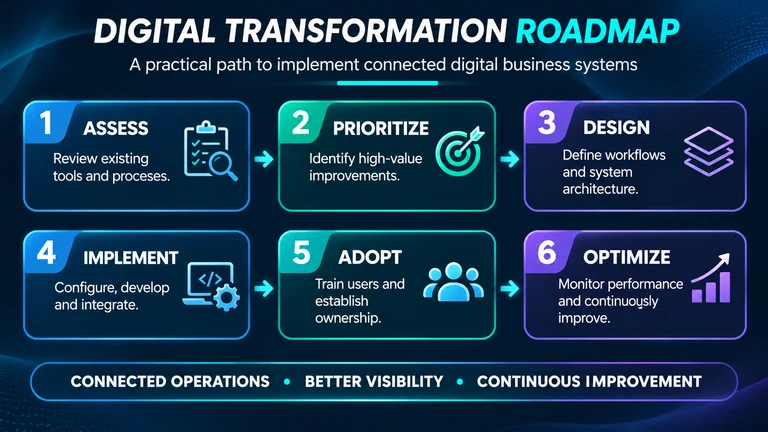
| Stage | Focus | Expected outcome |
|---|---|---|
| 1. Assess | Review existing tools and processes | Understand operational gaps |
| 2. Prioritize | Identify high-value improvements | Establish implementation priorities |
| 3. Design | Define workflows and system architecture | Create an implementation blueprint |
| 4. Implement | Configure, develop, and integrate | Deliver connected capabilities |
| 5. Adopt | Train users and establish ownership | Improve operational adoption |
| 6. Optimize | Monitor performance and improve workflows | Support continuous improvement |
Organizations should define measurable indicators for each initiative.
Depending on the business, these may include process completion time, manual effort, data accuracy, reporting turnaround, order processing time, operational costs, or customer response time.
The right measurements depend on the business problem being addressed.
A system should be evaluated by the operational improvements it delivers, not simply by the number of features it provides.
Conclusion: Build Systems That Support Business Growth
Digital business systems are not just collections of software applications. They represent how an organization connects its people, processes, information, and technology to achieve its objectives.
The most effective implementations begin with understanding the business, improving workflows, defining responsibilities, and selecting technology that supports the desired operating model.
ERP platforms, custom software, integrations, business process automation, and AI-enabled capabilities can all contribute to this environment when they are introduced with a clear purpose.
For business leaders, the important question is not how many software tools an organization uses.
It is whether those tools work together, provide reliable information, support employees, and help the business operate more effectively.
Technology creates value when it becomes part of a well-designed business system.
That is the foundation of sustainable digital transformation.